
Supported apps
Saksi saves notifications from any app you choose. Edit and deletion labels are designed for WhatsApp and Telegram.
Last reviewed October 21, 2026
Saksi is not affiliated with any of the apps named on this page. App names are used only to describe which notifications Saksi can save.
Apps people often use with Saksi
| Kind of app | Examples | Guide |
|---|---|---|
| Messaging with dedicated support | WhatsApp, WhatsApp Business, Telegram | WhatsApp, Telegram |
| Other chat apps | Messenger, Discord, Google Messages | Social media and email |
| Social media | Instagram, Facebook, X, TikTok | Social media and email |
| Gmail and other email apps | Social media and email |
These are examples, not a complete list. Any app that posts notifications can be saved.
What each kind of app gets
| What Saksi does | WhatsApp one to one chats | Telegram one to one chats | Telegram groups and channels | Other apps |
|---|---|---|---|---|
| New messages saved | Yes | Yes | Yes | Yes, as notification records |
| Proven edits (Message edited) | Yes | Yes | No, shown as Updated | No |
| Deleted (app's own notice) | Yes, notice in English or Indonesian | No | No | Not expected |
| Possible deletion (unconfirmed) | Yes | Yes | No | Not designed for them |
| Alerts | Yes | Yes | No | Not designed for them |
WhatsApp groups use the same handling as WhatsApp one to one chats, but have not had their own test run.
Other apps
Saksi reads the title, text and longer text a notification shows, from any app, as long as the app is on in App Filter. For some messaging apps (for example Messenger, Discord, Gmail and some SMS apps) a Message edited badge can appear when the notification text changed. Saksi cannot confirm that it was an edit, and it sends no alert for it.
If another app shows chats in Android's conversation style, a message that drops out of its notification can be marked Possible deletion (unconfirmed). This has only been designed and tested for WhatsApp and Telegram, so for other apps it is a hint, not proof.
Why apps show different amounts of information
Saksi does not connect to other apps. It reads the notification each app posts, so it gets exactly what that app chose to show.
- Messaging apps usually show the sender and the message text, and often several recent messages in one notification. WhatsApp and Telegram add enough detail for Saksi to tell when a message was edited.
- Social media apps often show a short line about an action, such as a like, a comment or a new follower, and not the content behind it.
- Email apps usually show the sender and the subject, and sometimes the first line.
- Summaries such as "3 new messages" carry no message text at all.
The same app can also show more or less depending on its version, its own notification settings, and your phone's privacy settings.
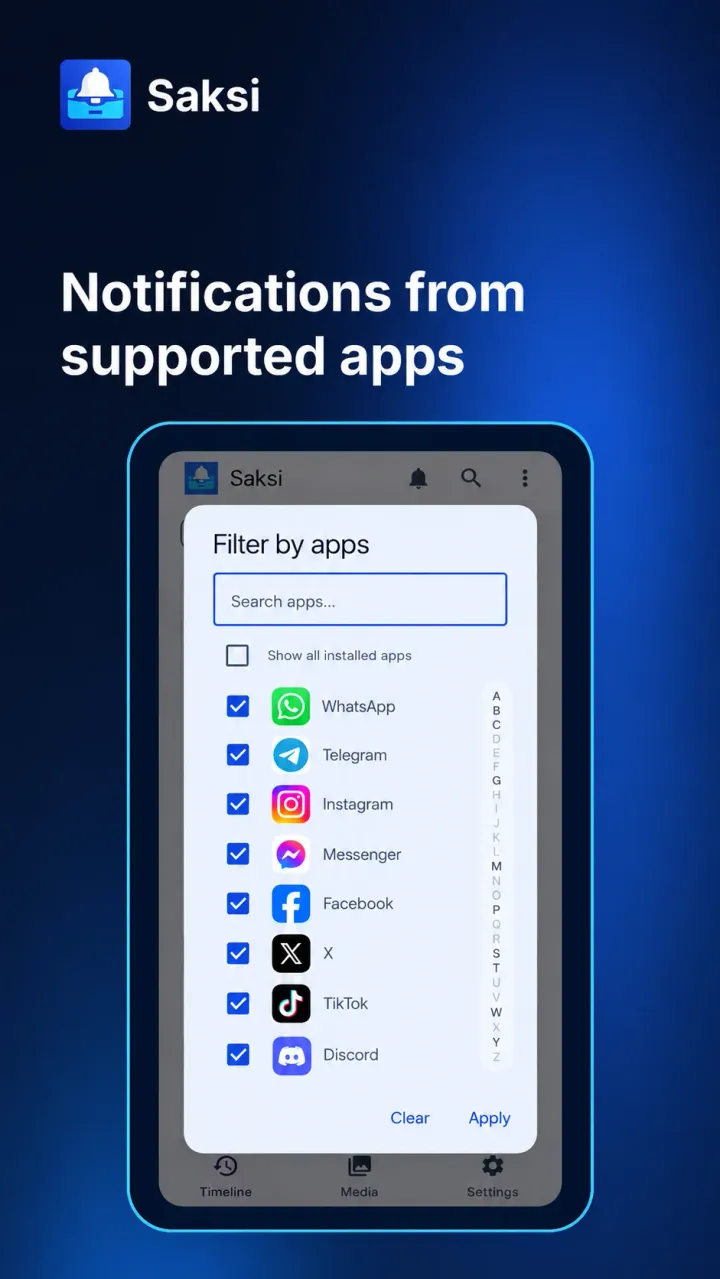
Choose which apps are saved
- Open Settings > Capture & Apps > App Filter. You can also use More options on the Timeline > App Filter.
- Switch off any app you do not want saved.
Every app is included by default, including apps you install later. Excluding an app stops future capture from it; notifications already saved stay until the 7-day cleanup removes them. Saksi never saves its own notifications. To find a built-in system app, turn on Show system apps.
To only see some apps without changing what is saved, use All apps on the Timeline. See Search and filters.
Missing or hidden previews
Saksi only sees notifications Android delivers to it. If an app does not post a notification, hides its content, or you muted the chat, there is nothing to save.
Common reasons a preview is missing:
- Android privacy features: Android can hide sensitive notification content, for example some verification codes on newer versions, or content on the lock screen. What is hidden varies by phone and Android version.
- The app's own privacy setting: many messaging and email apps can turn message previews off. The notification then says only "New message" or similar, and that is all Saksi can save.
- Summaries: a bundled notification such as "3 new messages" has no text. Saksi saves it as a Thread record at most.
If the content is hidden, the record shows Content unavailable. To get full text in future notifications, allow notification content in your phone's notification settings and turn message previews on in the app. The exact setting names vary by phone, app and version. Saksi cannot recover text that was hidden when the notification arrived.
Social media and email notifications
What Saksi saves from Instagram, Facebook, Messenger, X, TikTok, Discord, Gmail and other email apps, and which labels to expect.
Privacy and permissions
Your notification history stays on your phone. Which permissions Saksi uses, what can leave the phone, and what Saksi does not ask for.